Splat Repair: an open-source Gaussian splat editor with a repair brush
Splat Repair is a free, Apache 2.0 licensed editor for Gaussian splat scans that rebuilds the surface under a brush stroke.
Paint over a floater, a sign or a hole in a scan and Splat Repair rebuilds the surface under the stroke. Fast Fill fits the surrounding surface on the CPU in about 0.3 to 1.5 seconds on a 550,000-splat scan; Deep Fill uses the LaMa inpainting model on an NVIDIA GPU (about 20 seconds on an RTX 4090), and an optional bridge hands the view to Photoshop's fill tools. It reads PLY, .splat and SPZ, runs on Windows, is Apache 2.0, and its author calls it an early release.
Why it mattersClean-up for scanned splats, which had few editing tools until now.
What is new
Splat Repair is an editor for Gaussian splat scans. A Gaussian splat is a 3D capture made of many soft points. You paint over a floater (a stray cloud of points that hangs in front of the scene), a sign or a hole, and the tool rebuilds the surface under the stroke.
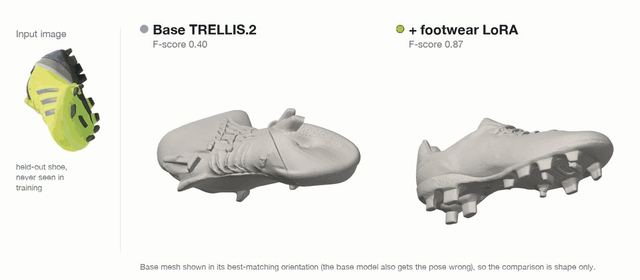
The author built it in eight days and calls it an early release. The README warns of rough edges and advises keeping copies of your scans. Flat or gently curved surfaces such as walls, signs and floors fill in in about a second. Strong repeating patterns, such as a shoe sole, are harder, and the fill can show.
- Fast Fill fits the surface around the hole and copies nearby splats. It runs on the CPU and takes about 0.3 to 1.5 seconds on a 550,000-splat scan.
- Deep Fill renders the view, fills the gap with the LaMa inpainting model, and turns the result back into splats. It needs an NVIDIA GPU and takes about 20 seconds on an RTX 4090.
- Photoshop fill is optional. It sends the rendered view to your own copy of Adobe Photoshop, which uses its Content-Aware or Generative Fill.
Tools and files
The tools include a 3D brush, a lasso, a clone stamp and a clean-up tool that finds floaters. The app reads and writes PLY, .splat and SPZ files. PLY is the working format, and the README says it round-trips without any change to the data.
What you need and licence
The app is tested on Windows 10 and 11 only. The README says it has not been tested on macOS or Linux. It needs Node.js 22 or newer and Python 3.10 to 3.13.Deep Fill also needs an NVIDIA GPU, a CUDA toolkit, MSVC build tools and about 3 GB of downloads. Everything installs in the project folder.
The project is under the Apache License 2.0. The README says the LaMa model is published under Apache 2.0 as well, but it was trained on the Places2 dataset, which has its own terms. It advises checking those terms before commercial use.