

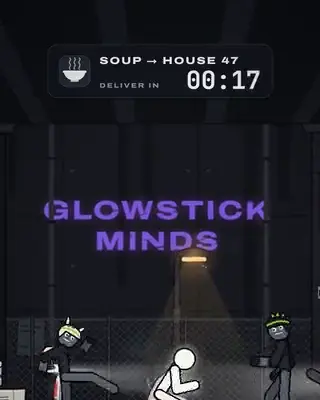


Glowstick Minds Stickman Reels Workflow
Premium glowing stickman reels about psychology and money, ready to post. One payment, yours for life.
Give Claude an idea, a comparison or a life lesson, and get a finished 15-second stickman reel: glowing characters acting in moody lit 3D rooms, a music track with every hit on the beat, a cover and a ready-to-post caption.
Special offer: one payment of $20, lifetime access, every future update included.
What's inside
- The full step-by-step system behind the channel, from idea to posted reel
- Glowing stickman characters with real body acting: walking, sitting, slumping, celebrating
- Moody lit 3D rooms (bedroom, kitchen, office, lift, rooftop, cliff and more) ready to use, plus scripts to make new ones
- Split-screen A vs B reels, counters, speech bubbles, thought clouds and scroll-stopping payoffs
- Music beds and sound effects made locally, with every action cut to the beat
- Automatic quality checks for length, pacing, colour and loudness before you post
- Covers and captions that are ready to post, with tested hooks and hashtags
- A bank of 50 checked reel ideas, and the recipes from every finished reel so you can repeat what worked
The main skill
Give it an idea, a comparison or a moral and it plans your whole reel: the scene, the music, every beat and the payoff.
Running in 3 steps
Every workflow ships ready for Claude Code. You don't install or configure anything by hand.
- Unzip the folderPut it anywhere on your computer.
- Open it in the Claude appIn the Claude desktop app, go to Code and choose the folder.
- Say the magic words"Set it up for me"Claude installs everything and walks you through your first video.
What you need
Check this before you buy. The workflow uses these tools; they aren't included and you install them yourself.
| Software | Cost |
|---|---|
Claude Codein the Claude desktop app, needs a paid Claude plan | Paid |
| Free | |
| Free | |
| Free | |
| Free | |
ComfyUImakes the music and sound effects | Free |
Blenderoptional, only for making new rooms | Free |
| Computer | Minimum |
|---|---|
| System | Windows |
| Graphics card | Recommended: NVIDIA graphics card |
| Memory | 16 GB+ |
| Disk space | 15 GB free |
Any other free tools the workflow uses are installed for you during setup.
Not included in the price. You also need: Claude Code (paid subscription).
Lifetime access and updates
New recipes, fixes and techniques keep coming. For as long as you own it, you get every update: by email, on your order page, or by telling Claude "update this workflow".
- v1.12026-11-16Latest
Six new finished reels as worked examples: a crowd uprising, a freeway shortcut gone wrong, a two-panel life story, an endless procrastination loop, a delivery-rider fight and a caged-dog rescue. New rooms and props, and a second version of every reel so you can post the one that wins.
- v1.02026-11-07
First release: the full stickman reel system, 15 lit rooms and three finished example reels.
Questions before you buy
All questionsDo I have to set it up myself?
No. Unzip the folder, open it in the Claude desktop app (Code, then choose the folder) and say "set it up for me". Claude does the installing and checking for you.
What software do I need?
Every workflow page has a "What you need" list: the tools (free or paid), the computer it runs on and the graphics card it needs. Those tools aren't included; check the list before you buy, because sales are final.
Can I get a refund?
Crypto payments can't be reversed and files are delivered instantly, so sales are final. If a file is broken or missing, we'll fix it or send it again.
How do I get updates?
Three ways: the update email (with a fresh download link), the "Get latest version" button on your order page, or telling Claude "update this workflow" inside the folder. Claude merges the new version without touching your own files.
What does lifetime access mean?
Workflows marked one-time are paid once: you keep the workflow and get every update for as long as you own it, with no renewal.
Made with this workflow
Real moments from the channel's reels. Tap any clip to watch it full screen.
 BTC
 ETH
 USDT
 SOL
Crypto-only payments · BTC, ETH, USDT, SOL + 300 more