CL Sculpt Assistant: pie menus, sculpt layers and detail transfer for Blender's Sculpt Mode
An early-access Blender add-on from Calappa Lab adds shortcut keys, pop-up menus and sculpt layers to Sculpt Mode.
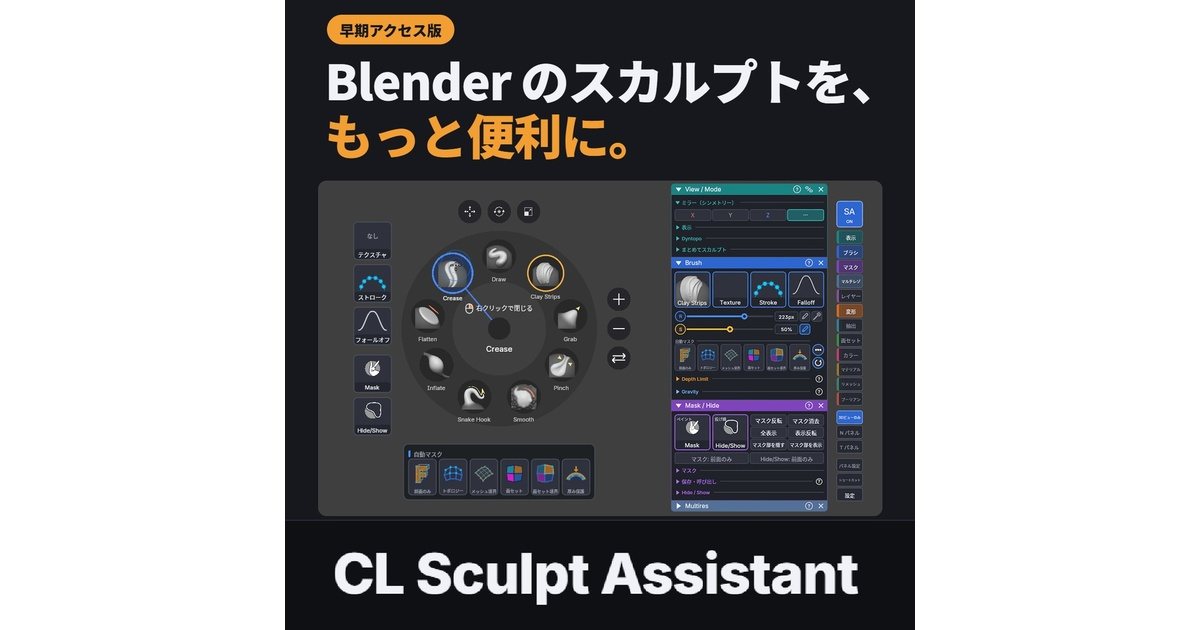
Calappa Lab's add-on adds temporary mask controls, pie menus, movable viewport panels, bend tools, sculpt layers, detail transfer after remeshing and Boolean layers to Sculpt Mode. It is in early access for 800 yen on BOOTH under GPL-3.0-or-later and supports Blender 4.5.2 to 5.2.x; the developer has tested it on Windows only.
Why it mattersFaster sculpting with fewer trips to the menus.
What is new
CL Sculpt Assistant is an early-access add-on from Calappa Lab for Sculpt Mode in Blender, the free 3D program. Sculpt Mode is where you push and pull a model's surface with brushes, a bit like working with clay.
The add-on adds shortcut keys, pop-up menus and panels that can be moved around the viewport, so you spend less time in Blender's menus. The store page says the add-on is still in development, so controls and layout may change.
How it works
The main controls are on keys that you hold or press while sculpting.
- Hold C to use a mask brush. A mask is a protected area that the brushes do not change. Hold Ctrl to remove mask instead.
- Q opens a pie menu of brushes, A opens mask controls and Z groups the view, mirror, Dyntopo and multires options.
- Base Point Bend, on key Y, bends geometry past a pivot you place, without first making a face set. The article gives fingers and neck posture as examples.
- Sculpt layers record changes that can be adjusted later. Detail transfer carries shape detail across a remesh. Boolean layers let you test a cutter before you commit.
- Version 0.87.2 added a twist option, a settle-shape option and a colour-coded range display for Base Point Bend. It also fixed an armpit problem when raising an arm.
Limits
Some tools are limited on multires meshes, in Dyntopo and on meshes with shape keys. The developer advises saving and backing up before you work.
Shortcuts may clash with studio keymaps, and the manual is still in preparation. Each panel has a help button instead.
Price and availability
The early-access price on BOOTH is 800 yen. The developer says the price may change after early access ends. Buyers get future updates on the same page. Digital purchases cannot be refunded.
The add-on works with Blender 4.5.2 to 5.2.x. The developer tested it on Windows 11 only, and macOS and Linux are not guaranteed. When read, the BOOTH page showed the listing as currently private.